Nano has already supplanted the great EMacs and Vim as the most popular text editor of all linux distros, for though it has many omissions in functionality it scores over the older, more complete programs in two important respects. First, it is slightly simpler; and secondly it has the text “^ Exit” inscribed in highlighted text on its footer
EDIT : This sees to be going over some people’s heads. It’s a hitchiker’s guide to the galaxy reference.
The Hitchhiker’s Guide has already supplanted the great Encyclopaedia Galactica as the standard repository of all knowledge and wisdom, for though it has many omissions . . . it scores over the older, more pedestrian work in two important respects. First, it is slightly cheaper; and secondly it has the words DON’T PANIC inscribed in large friendly letters on its cover.
I like Nano; it lets me do what I need to do quickly, simply and efficiently.
That’s why nano gets used more than vi/vim. In the past, the majority of people using terminal text editors were geeks and developers. Now the majority of people using the terminal text editors are more often casual users who have no use for putting the time and effort to learn vi/vim, especially because they have no need for the extended functionality
I don’t get you people. Proper copy/paste support is “extended functionality”? I beg to differ. This is basic functionality.
And no, single line copy/paste as offered by nano, or copy and paste through the terminal is not proper copy/paste.
Blasphemy! Ctrl+k is multi line!
Doesn’t matter if it’s not “proper” if it works.
Ah, I looked it up, it seems it actually has multiline copy/paste? Alt-A to mark the start of the text, Alt-6 to copy, Ctrl-U to paste. I’ll try it out next time I’m stuck in nano, thanks!
this functionality is only bloated and complicated for the person using a terminal a couple of times a year.
i say that while looking like this when i see any editor but
vimused:
but i know my co-worker looks at me like this, because he knows he only ever uses
vi:
Sit down by the campfire my dear youngin’ and I’ll talk you tales of a terror myth called ASSEMBLY
OOOOOooOOOOOooOOO!
Machine language! Direct memory addressing! AAAAAaaaaa!
MWAHAHAHAHAHAHAHAHA!!!
Computers existed before the year 2000, you silly children…
Don’t be silly, grandpa. Everyone knows assembly doesn’t exist.
https://demoscene.assembly.org/
My favorite when I was a kid was absolutely, and without a doubt Second Reality by Future Crew. Full screen 3-D object rendering at 30 frames a second on a 486SX/25 CPU without a graphics card. in 1993
Future Crew, active in the early 90s, was a legendary group within the demoscene. They were acclaimed for their groundbreaking demos, like “Second Reality”, that demonstrated advanced programming, visual artistry, and music composition. These works set new standards for what was possible in real-time computer graphics, and they inspired countless artists and programmers around the world. Despite the group’s dissolution in 1994, Future Crew’s influence on the demoscene and the broader fields of graphics and game development is undeniable, and their legacy continues to inspire creativity in the digital world.
Fucking legendary.
And it fit on a floppy
Edit: I remember my friend Nick brought back a copy of Second Reality from ASSEMBLY 93, an annual convention of assembly developers where they would show off their programming prowess with these demos. Me and my friends got to see it before it hit the BBSs and Usenet. So fresh, yo!
That’s incredible work.
And it makes me remember another gem of the period, Elite! I first played Elite Plus, but when I heard about the original, the magic of being able to navigate all those worlds in such a small format fired my imagination.
Just watched it all and goddamn. Rabbit hole time. Haven’t remembered what it was like back then for a long time. An age of marvels and wonder.
Marvels and wonders indeed
oh, those halcyon days…
I remember seen it in 1993 or 1994 in a friend’s PC with a Gravis Ultrasound. It was AMAZING. For comparison, the games of that year were almost all 16 bits platformers.
I think it took me over an hour to get my sound blaster pro configured just right
Here’s another reference from the era, let’s see if you get it:
“Did you bring the pages?”
It was from a game, but not a platformer
Nano has proper copy/pate, it works identical to any text editor. Mark -> copy/cut -> paste
That’s true, if you had no GUI for an extended period, it’d be worth learning something that could do that. Although, other people are saying there’s a way in nano.
If you’re using a GUI, and working in an emulator, who cares if it’s not “proper”?
Vi lets me jump to the place I need to be and make edits to a config file very sticky, simply, and efficiently. But all that came at the cost of the steep learning curve.
Same, although I did wish I could like, just select text with my mouse properly, or move the cursor to a place by clicking there, delete blocks without cutting them, and/or remember the copy/paste/undo shortcuts…etc
Many were increasingly of the opinion that they’d all made a big mistake in making text editors in the first place. And some said that even making operating systems had been a bad move, and that no one should ever have built computers at all.
In the beginning, boolean algebra was invented.
This has made a lot of people very angry and been widely regarded as a bad move.
I still think smart watches are a pretty neat idea.
Same here, computers have gone the wrong way; from utility to project to pet.
I see Hitchhikers Guide to the Galaxy parody, I updoot
If ind it quite funny that the majority of the posts are about the text editor and not about the blatant hitchhiker’s guide reference to the point where I had to specify it in the OP and then the thread exploded after that point.
People don’t have to look up “how to exit nano”
Also you can’t flex as a dev for using nano tge same way as using Vim or a derivative.
It’s there and it’s easy. Most people don’t use terminal text editors unless they are SSHing in a server, and they would only do that sporadically, so it makes no sense to become proficient in a complex text editor like vim or Emacs for that little use case.
Sidenote: personally, I learned vim once, and used it extensively every day for two years. I stopped using it for one year and was back to square one. Now I use vscode for everything… Even when I’m using SSH, because vscode supports SSH
Every editor “supports” SSH, you can mount files on a remote SSH server via SSHFS.
And instead vscode supports SSH (without quotes), you can connect to an SSH host, and it will open files and folders on the host like it does locally. And if you open the integrated terminal it will run on the remote host. And it will forward the git login agent so you can commit or push with the credentials of your local machine. And it can forward ports from the remote.
Sure, but none of that is special in any way. That’s just what SSH does already. If you like that to happen in your editor GUI, by all means, you do you.
What I’m saying is not a single of those features is an accomplishment of vscode and you can do that with every editor you like, or even without any. I didn’t want people to believe they’d need to switch to vscode to achieve any of that. That was my angle.
I can’t and I’m not going to comment on the integration or the workflow, if you’re the audience for those kinda things, it’s probably great, give vscode a try. It’s probably obvious that I am not but hey, different strokes and all.
By the way, regarding integration, I just learned from a colleague last week that he uses emacs for editing remote files too. You can just open a file as:
/method:user@host:filename, with method being ssh or ftp for examplehttps://www.gnu.org/software/emacs/manual/html_node/emacs/Remote-Files.html
It’s kind of sad that many people don’t use the shell / terminal anymore, especially as part of their regular development flow. There’s so much scripting and so many shell commands you can use that will do things you just can’t do in vscode. And having an editor like vi immediately available is part of that flow.
For me, vim and the shell are my primary IDE. I rarely fire up vscode. But I guess I’m getting old. Still faster than the younger devs who mainly use vscode and then struggle when they are forced to use the command line due to whatever circumstance where vscode is not available or appropriate. Kind of makes me sad. Feels like a valuable skill is being lost.
Oh, I use the terminal a lot, it doesn’t throw me off. When I can’t have vscode (e.g. small openwrt devices) I can use vim. It’s just plain easier to use vscode for editing files when I can
Vscode has terminal built in too
I used vim, vim based stuffs, spacemacs, jetbrains, netbeans, atom etc… Now I use mainly claude code, sometimes, rarely I also open vscode. Shame because I know a lot of shortcuts, but not needed.
I always forget that vscode can do that
I only use terminal text editors anymore when I need to edit config files à la
sudo nano. I just don’t trust visual text editors to do that stuff, I’ve been burned too many times in the past. Files “saving” but not actually saving. Files actually corrupting or changing ownership on save. Etc. Good old nano, doesn’t fuck with the critical system files any more than I already am.I use kate for almost everything. I can open and edit files over sftp, and it has a terminal like vscode as well. I should try vscode again, it’s been a while.
Konqueror was the goat. Split screens. Browse the web. Browse remote directories. Browse local directories. I was sad when it went away.
Yeah! I used to use it as my default browser back when it was viable to do so. Dolphin can do all of that pretty well except browse the web. I do kinda wish there was an excellent KDE web browser. Falkon might be nice, but I’d really need a way to integrate with Bitwarden/Vaultwarden.
It is preinstalled and does what it needs to do. What else can I ask for?
I’m ashamed to admit that, despite having read Hitchhiker’s Guide to the Galaxy several times, my Vim elitist mindset made me miss the reference.
Sometimes you need a real good slice of humble pie to remember what’s important in life.
Sometimes you need a real good slice of humble pie to remember what’s important in life.
digital watches
They’re neat!
We should have stayed up in the trees.
Nano is to EMacs/Vim as Notepad is to Notepad++ or VSCode (Nano has features Notepad doesn’t, but you get the point).
I don’t do a ton of code editing directly on the CLI. I do things like change parameters in config files or open a file to read it quickly. If I’m doing more heavy editing, I’ll use a GUI editor (with an SFTP extension if I’m working on a headless server). So programs like Vim and EMacs have never been useful for me.
To each their own (and I have all the respect for anyone who knows how to exit Vim without looking it up) but I’m guessing the majority of people have a similar experience.
I spent enough time learning vim that I can do basic navigation and text editing. I’d like to be able to navigate efficiently like some of the savants out there, but the effort to get to that point is more than I’m willing to put into in.
Being good at nano does not transfer like notepad transfers to notepad++ or kwrite.
vim does not respect nano shortcuts and modes are simply a barrier: an extra keypress and another thing to keep track of. It slows you down significantly.
Noone good at nano would switch to vim naturally, you have to force yourself to endure until you catch back up to what you could long do in nano.Conversely I don’t know a single shortcut, behavior, or info notepad shows that np++ or kwrite don’t have. Besides maybe bracket and quote completion in kwrite which you’d have to disable in settings.
And on the other hand the advantages are more directly visible, like tabs, syntax hilighting, …
You might not immediately intuit the shortcuts for tab management, but you can still use tabs and then not return to notepad due to missing them.Sure, Notepad transfers to other GUI programs better than Nano transfers to Vim or EMacs. But that has little to do with Notepad and more to do with GUIs typically supporting similar shortcuts. Like I said, it’s an imperfect analogy.
I think you missed my original point. Most people wouldn’t describe themselves as “good” or “bad” at Notepad or Nano. They’re simple programs designed for simple editing. The learning curve is very low for both. Advanced editors have differing learning curves, but they’re all a lot more steep.
And my original point was that, because many people do only simple editing in a CLI and more advanced editing in a GUI, it makes sense that Nano became the most popular for CLI due to its shallow learning curve.
vim does not respect nano shortcuts and modes are simply a barrier: an extra keypress and another thing to keep track of. It slows you down significantly.
You obviously haven’t used much vim if you think modes slow you down. First it means you don’t have to bring your right hand all the way to the arrows whenever you want to move the cursor, secondly it means you can use shortcuts without adding a modifier everytime - this translates to fewer keypresses.
I was talking about the new user experience. No new user can navigate without the arrow keys, the most you can expect is looking up i and esc to enter and exit edit mode, and then using both modes the same way being annoyed at being in the wrong mode when something doesn’t work.
Keeping track of the modes is also obviously something only problematic to those not familiar with vim.If you customize nanorc then you can also point and click with the mouse and highlight text and copy/paste like it was a GUI from the terminal. Most people shiting on Nano just never learned it because they learned the editor they are familiar with. Same reason I shit on vim.
I’ve wanted to move elsewhere for a long time, thing is I don’t use nano for programming, I use it for config files. For programming I use an IDE, and every time I’ve tried leaving my IDE for emacs with a language server I find I just can’t be bothered to set it up and learn it and make the move. Maybe because while I have some gripes with my current setup…they’re very minor
People program in things like nano? Wow. I want to learn that. I also have only really used them for configs, terminal profiles, …
Can they offer autocomplete and syntax highlighting like vscode can, extendable for different languages and whatnot?
Nano has syntax highlighting out of the box IIRC. I’ve used it for programming in a pinch but no, it’s nowhere near as extensible as VSCode or Vim. It’s a text editor, not an IDE
nano has supported syntax highlighting for a good long while, and for the Debian package at least, comes with a bunch of predefined languages in
/usr/share/nano/*.nanorc.I wouldn’t recommend it for large projects, but I’ve created and edited shell and Perl scripts with it plenty of times.
I’ve programmed in notepad. Not often or very much, because even though I operated in a Windows environment, I didn’t hate myself, but simple edits or creating small files was possible if you knew what you were doing. More could be done too, if you wanted to pretend you were a caveman programmer.
oh no, not again.
I’ve used Vim, NeoVim, Micro,
mg(1), JOE, and even MS Edit (both the original DOS version and the recent Rust clone). No matter how complex and tailored I wrote my config, though, the features I actually used were included in GNU nano and/or my command shell without any of the bugs, bloat, learning curve, or slop.Using it as my default just makes sense.
Nano is great for editing files. It is absolutely terrible for any amount of text processing or anything other than raw code copied from a tutorial
You guys do text processing on terminal editors?
was gonna say, I have IDEs and other dedicated programs for that
Of course. What do you think vim users do?
Fuck all? ;-)
Alternative joke: try to figure out how to exit
What sort of text processing? I rarely do this, so I usually just rely on things like
sed,ed,sort,uniq, and other shell commands to handle this.
DOS edit was just an alias to qbasic /edit packaged in a .com
ed is the standard text editor
I shall prematurely end this comment chain with the obligatory xkcd. Yes, you’ve seen it before, and you will see it again.
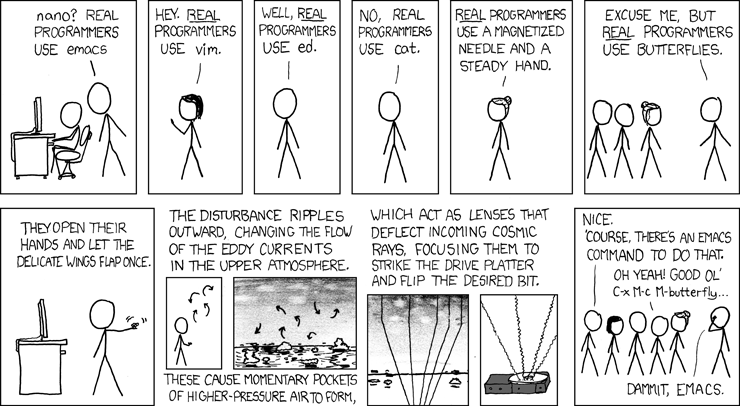
Fun fact, in emacs they added
M-x butterflyas a reference to this xkcd.i’ve been using emacs for a while and i cannot believe i’ve never thought to check for that. sure enough, there it is. amazing.
(for people missing the reference: https://www.gnu.org/fun/jokes/ed-msg.html )
Same reason people use notepad on windows. It’s already installed on almost every distro
Many were increasingly of the opinion that they’d all made a big mistake moving away from ‘ed’ in the first place, and some said that even ‘ed’ had been a bad move, and that no-one should ever have left punch cards.
I’m in the “been working with Linux since the 90s” gang so I call vim vi and nano pico and when I started there was a coolness factor to be considered. I was incredibly uncool so I used whatever I wanted, including pico - I mean you used pine for email back in the day and the interface was nearly identical, so whatever.
But I did want to be at least a tiny bit cooler, so I learned vi in a fairly rudimentary fashion. I can edit, jump, delete, search, replace, copy and paste - oh, and I can exit. I’ve spent so much time using vi, that my brain doesn’t even have to think about exiting, not even whether I want to write or not. It just happens like second nature. It’s actually gotten to where nano seems unduly burdensome to me.
But really, I prefer an IDE for programming. CLI editors will always be for configuration files and shell scripts to me.