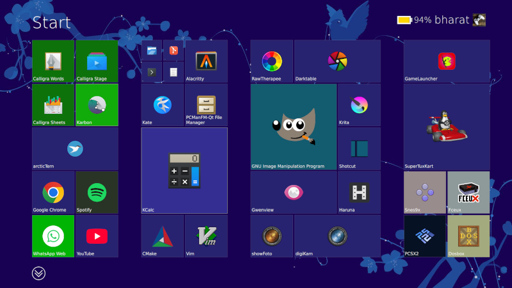
If you were asked to pick the most annoying of the various Microsoft Windows interfaces that have appeared over the years, there’s a reasonable chance that Windows 8’s Metro start screen and interface design language would make it your choice. In 2012 the software company abandoned their tried-and-tested desktop whose roots extended back to Windows 95 in favor of the colorful blocks it had created for its line of music players and mobile phones.
Consumers weren’t impressed and it was quickly shelved in subsequent versions, but should you wish to revisit Metro you can now get the experience on Linux. [er-bharat] has created Win8DE, a shell for Wayland window managers that brings the Metro interface — or something very like it — to the open source operating system.
The most beautiful horror to ever exist lmao
This is mean-spirited. Someone created something that they like and shared it with others, and people (who are clearly not the intended audience), are taking a big public dump on it.
I didn’t like the Windows 8 start menu, but attacking someone who did like it and who is sharing how to experience the same thing on Linux, is pretty dickish IMO.
That’s one of the aspects I like from Linux: The ability to make the desktop your own. And, like you, I’ll defend that preference and choice regardless of how terrible it is ;)
Sometimes for no apparent reason I will reconfigure my desktop to look like an old OS (Workbench, MacOS, OS/2, Nextstep, etc…)
Workbench? How does one go about doing this, I’d love to feel like I was on an Amiga again lol
e: also is there a way to make my shell look like the commodore 64 blue screen
You will have to submit to XFCE, I have it as a spare when I feel nostalgic from my daily DE (KVM).
- XFWM4 (has both 1.3 and 3.0)
- GTK2 which sadly is just GTK2.
- Either This or This
- Mice:
- Fonts or Topaz Nerd font
- Wallpapers (Though I don’t use them)
- SDDM (There are several available)
Icons are… hard to accomplish:
There are a couple of png libraries out there, so it is possible to recreate either the 3.5 or posterior looks, however the older workbench with its lovely drawers and different sized icons is something I haven’t achieved.
You can still pick a modern DE, add png icons to the desktop and recreate something like this without the filesystem navigation (or prefs):
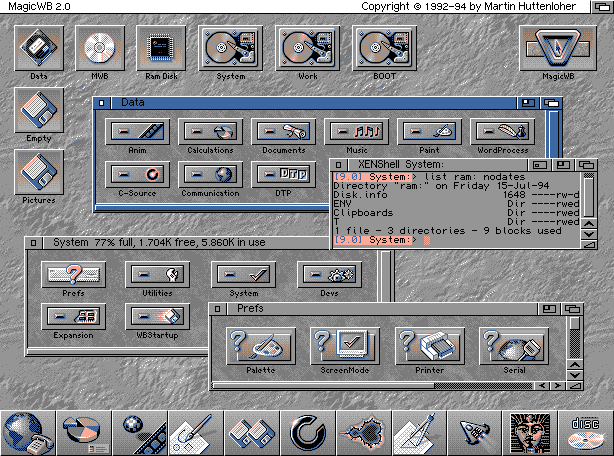
(I found interesting the lower bar with the nextstep-like icons, though this was on 1994 so…)
That’s one of the aspects I like from Linux: The ability to make the desktop your own.
100% this.
Every time I try a new distro I spend 1-3 hours messing around with the settings, themes, and widgets to get things exactly the way I want it. This is why Linux rocks.
I am not a developer, but I can only imagine how demotivating it would be if I were to put in the effort to develop a layout I like, share it with other people, and then encounter a post like this.
It lacks the most fundamental part of it though: live tiles.
no it doesn’t, you just have to add them for apps yourself. the readme has a whole section dedicated to live tiles.
this is INCREDIBLE news for approximately 3 people on the planet lol
I have to imagine at least 2 of those 3 worked on it
It’s gotta be 4 to make a full set of tiles
Metro UI is good… For tablets and phones. But it doesn’t work with the keyboard mouse combo.
Makes you wonder why it died on tablets and phones.
The few people I know who had a Windows phone really liked the UI, the platform was just mismanaged by Microsoft. For example, they already had a problem with having too little apps in their store and then they broke app compatibility between Windows phone 7 and 8. I guess Google intentionally breaking compatibility of their services on Windows phones didn’t help adoption either.
A bit ironic when Microsoft struggles because someone else keep breaking compatibility. Although I would prefer it to keep trying because that would have been more choice and competition in the mobile OS land